The sensor gets all the attention. The gateway carries all the risk.
In an environmental monitoring deployment, the sensor is the part everyone fusses over. It gets calibrated, certified, mapped to a location, and tied to an alarm threshold. The gateway that relays its readings to the cloud gets almost none of that scrutiny. That asymmetry is the whole problem.
A perfectly calibrated probe inside a -80°C freezer is worth nothing if the gateway carrying its data is sitting on a network it can no longer reach. And the failure is quiet. The readings just stop arriving. An empty chart looks a lot like a healthy one until someone goes looking, which is usually after the damage is done.
For Canadian laboratories, pharmacies, and hospitals, that silence is where the risk lives. A delayed excursion alarm is not a networking footnote. It is spoiled inventory, a hole in the audit trail, and in clinical settings a patient-safety exposure.
Why the gateway goes dark
Connectivity failures are rarely exotic. They come from ordinary operational changes that nobody connected back to the monitoring system, because the people making the change usually do not know the gateway exists.
- Wi-Fi changes. IT rotates a password, renames an SSID, or swaps an access point. The probe is unaffected and the sensor keeps reading. The gateway, still holding the old credentials, silently falls off the network.
- Power interruptions. A brief dip restarts the switch or the router. The question is what the gateway does on the way back up. If it waits for a DHCP lease that the network hands out in a different order, lands behind a captive portal on a guest SSID, or expects a static route that changed, it powers on without ever reconnecting.
- Firewall and network changes. A new security policy, a re-subnetted VLAN, or a tightened egress rule blocks the specific outbound port the gateway needs to reach the cloud. The device is online, the link light is green, and not a single datapoint is leaving the building.
Illustrative failure (not a specific customer, the shape of the problem): A facilities team replaces an aging Wi-Fi router over the weekend. The new unit ships with a default SSID that does not match the gateway’s saved configuration. The gateway drops off Friday night. A freezer crosses its threshold Saturday, the excursion alarm is generated locally, and it has nowhere to go. The on-call team is never paged. Monday morning, the loss is already counted.
The dangerous property is silence, so detect the silence
The reason these failures hurt is that absence of data carries no urgency on its own. A blank stretch of chart does not page anyone. The fix is to treat missing data as an event in its own right: the platform should expect a regular heartbeat from every gateway and raise an alert when one stops checking in, separate from any temperature alarm.
This is the part teams skip. They alarm on bad readings but not on the absence of readings, which means the one failure that disables every other alarm is the one nobody is watching for. Monitor the monitor. If a gateway has not reported within its expected interval, that should reach a human before the next reading would have, not after the inventory is lost.
What backup connectivity actually buys you, and what it does not
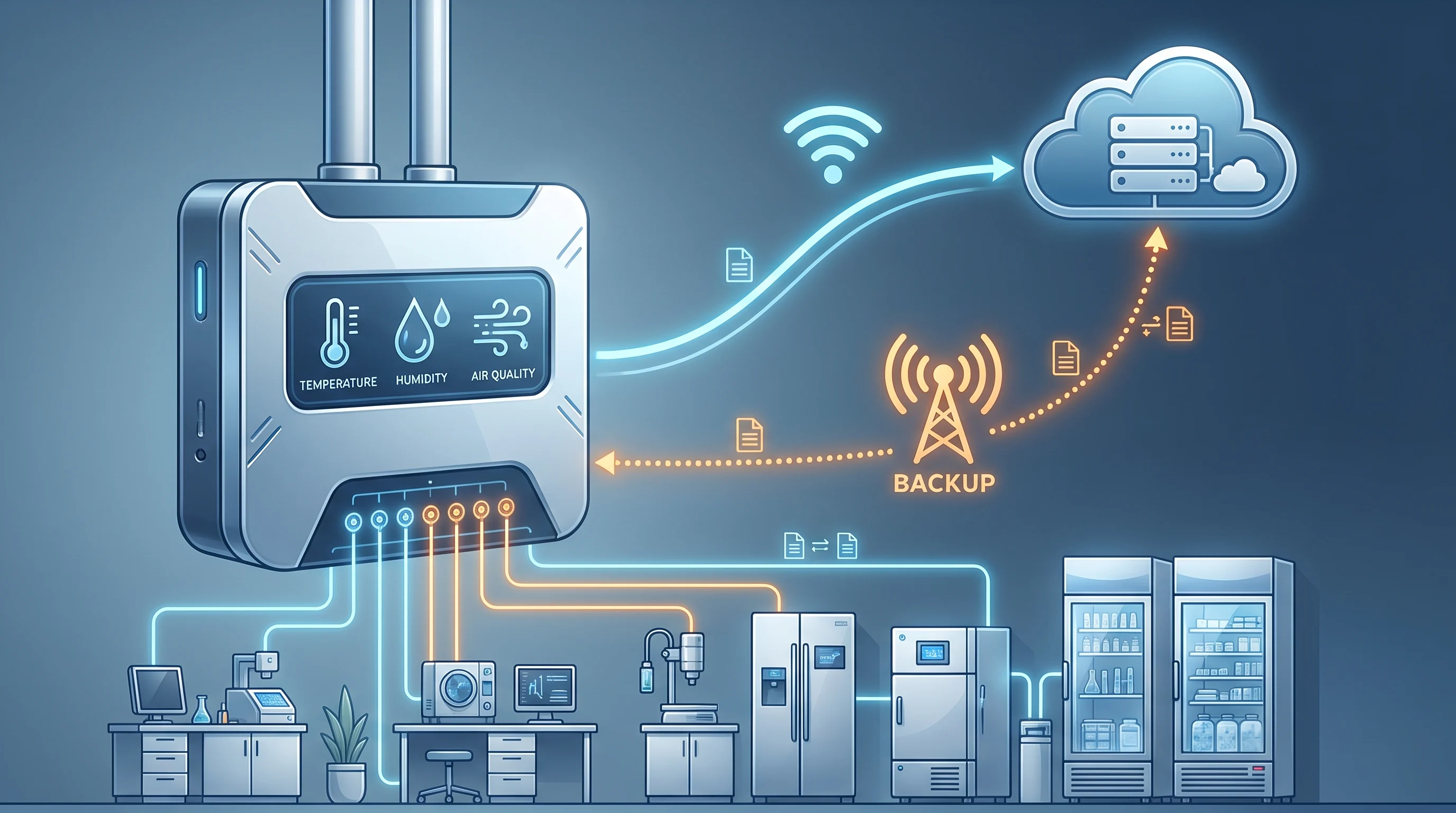
A secondary, independent communication path is the structural answer to most of the failures above. The common approach is cellular backup: if the primary LAN or Wi-Fi link fails, the gateway fails over to a cellular connection and keeps the data stream and alarm path alive. Because cellular rides a mobile network instead of your local cabling, switches, and firewall, it survives the site-wide IT changes that take down the primary path. The Wi-Fi password rotation that silently kills the LAN connection does not touch the SIM.
That resilience is real, but it is not free of tradeoffs, and the honest version matters more than the brochure version:
- Cold storage is often where cell signal is worst. Freezer farms, -80°C units, and stability chambers tend to live in basements, interior rooms, and concrete-walled spaces, exactly the places where cellular reception is weakest. Backup connectivity that assumes good signal can fail precisely where you most need it. Verify signal at the physical install location, not at the building entrance.
- Failover is only as good as its trigger. A backup path that activates after a long timeout still leaves a monitoring gap. The question to ask a vendor is not “does it have cellular?” but “how fast does it detect the primary is down, and how fast does it cut over?”
- It is a backup, not a license to ignore the primary. Cellular should be the safety net for the hours it takes to notice and fix the real problem, not a permanent crutch that hides a chronically broken LAN.
[PLACEHOLDER: needs approved content - specific ATEK gateway cellular backup specs, failover detection time, and any uptime figures from sales/engineering]
Change management is the cheapest resilience you can buy
Hardware redundancy handles the failures you did not see coming. Process handles the ones you could have. Most gateway outages trace back to a planned IT change where the monitoring system was simply not on the list of things to check.
Environmental monitoring is a regulated requirement, and uptime is part of the compliance posture, not a nice-to-have. So put the gateway into the change-management process where it belongs.
Decision rule: Any planned IT change, including firewall updates, access point replacement, password rotations, and subnet migrations, triggers a pre-change notification to the environmental monitoring owner. Gateway connectivity and alarm routing get verified explicitly before the work starts and confirmed again after it finishes. A two-minute check before the weekend router swap is cheaper than a freezer of lost inventory on Monday.