Make a stream available
This guide suggests an approach to take to make a strema available for use with another sensor. If when replacing a transmitter the new stream does not appear in the list of available streams, follow the steps below to make it appear: Once a new transmitter has been sent by ATEK, follow the steps below to replace the old one:
-
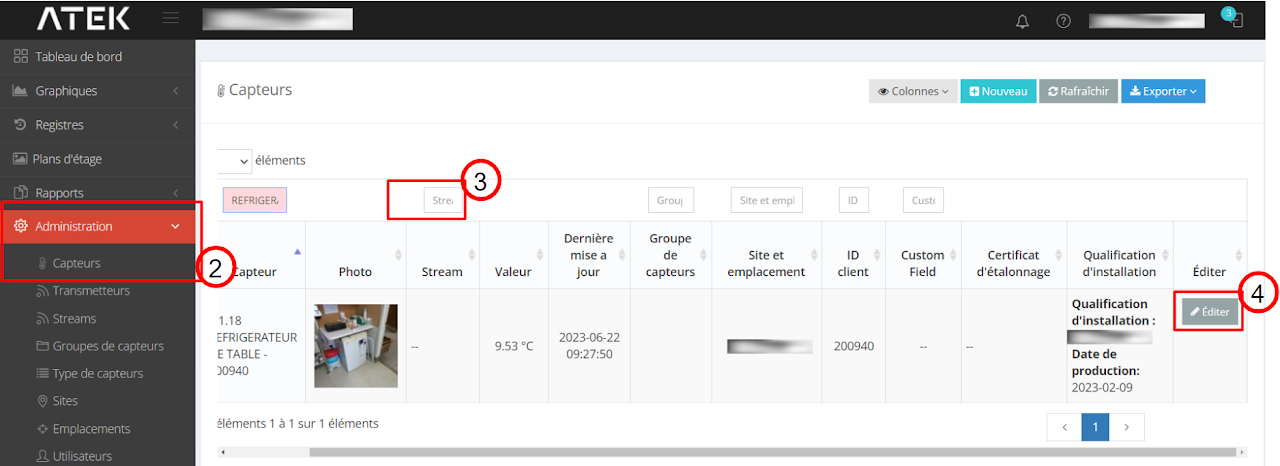
Click on “Administration” then on “Sensors”
-
Use the Stream box to search for your equipment name
- The name of the new stream consists of the MAC address of the new transmitter followed by a “ _ ” and a number at the end of the name of the old stream
-
Scroll the window to the right then click on “Edit”
5. In the Stream field, select “–”
6. Click on “Save”
Important: For any questions related to this procedure, contact ATEK Support.
Imported from Google Sites.